Loading...
Customer case study

Convocation photos in graduates' hands, before they left the stage area

How Surya Digital, a photography studio in Trichy, used CamFi and the ShowMyPhoto Auto Uploader to move photographs from camera to online gallery during the 34th Convocation at PMIST, Thanjavur.

The short version

Surya Digital delivered PMIST convocation photographs online while the ceremony was still running. Photographers kept shooting as usual. CamFi carried each new photo from the camera to a computer, and the ShowMyPhoto Auto Uploader sent it on to the event gallery automatically.

  • No manual uploading by the photographers during the event
  • One continuous chain: camera → CamFi → computer → Auto Uploader → gallery
  • Graduates and families could look for their photos the same day
The problem every convocation photographer knows

A convocation is a long, repetitive, high-pressure day. Hundreds of graduates cross the stage one after another, each moment lasts a few seconds, and there is no second take. The photographers have to be exactly where they need to be, every time.

Meanwhile, graduates and their families are standing right there with phones in hand, wondering when they will see the pictures. The usual answer is "after the event": the team goes home, copies cards, sorts, uploads, and shares a link days later. By then the excitement has faded.

Surya Digital wanted to close that gap. The goal was not to change how they photograph, only to stop the uploading from becoming a second job during the event.

What Surya Digital did

For the 34th Convocation of Periyar Maniammai Institute of Science & Technology, the team combined their existing camera workflow with the ShowMyPhoto Auto Uploader. New photographs were sent to the event gallery continuously, in the background, so the people behind the cameras could stay focused on the ceremony and the graduates.

How the workflow worked, step by step

Four stages, one direction. Each photo moves forward on its own once the setup is running.

  1. Capture

    Photographers shoot the ceremony, stage presentations and group photos exactly as they normally would.

  2. Transfer

    CamFi, a wireless camera transmitter, sends each new photo from the camera to the connected computer.

  3. Auto upload

    The ShowMyPhoto Auto Uploader watches the chosen folder and uploads every new photo to the event gallery.

  4. Share

    Graduates and families open the online gallery and find their photographs.

The two tools that made it possible

ShowMyPhoto fitted around the existing camera workflow. Nobody had to learn a new way to shoot.

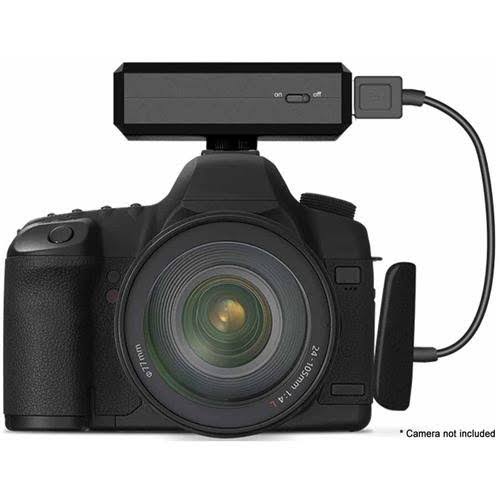
A camera with a CamFi wireless transmitter attached

CamFi: camera to computer

CamFi attaches to the camera and sends new photographs to a computer wirelessly, so files arrive without anyone swapping cards or plugging in cables.

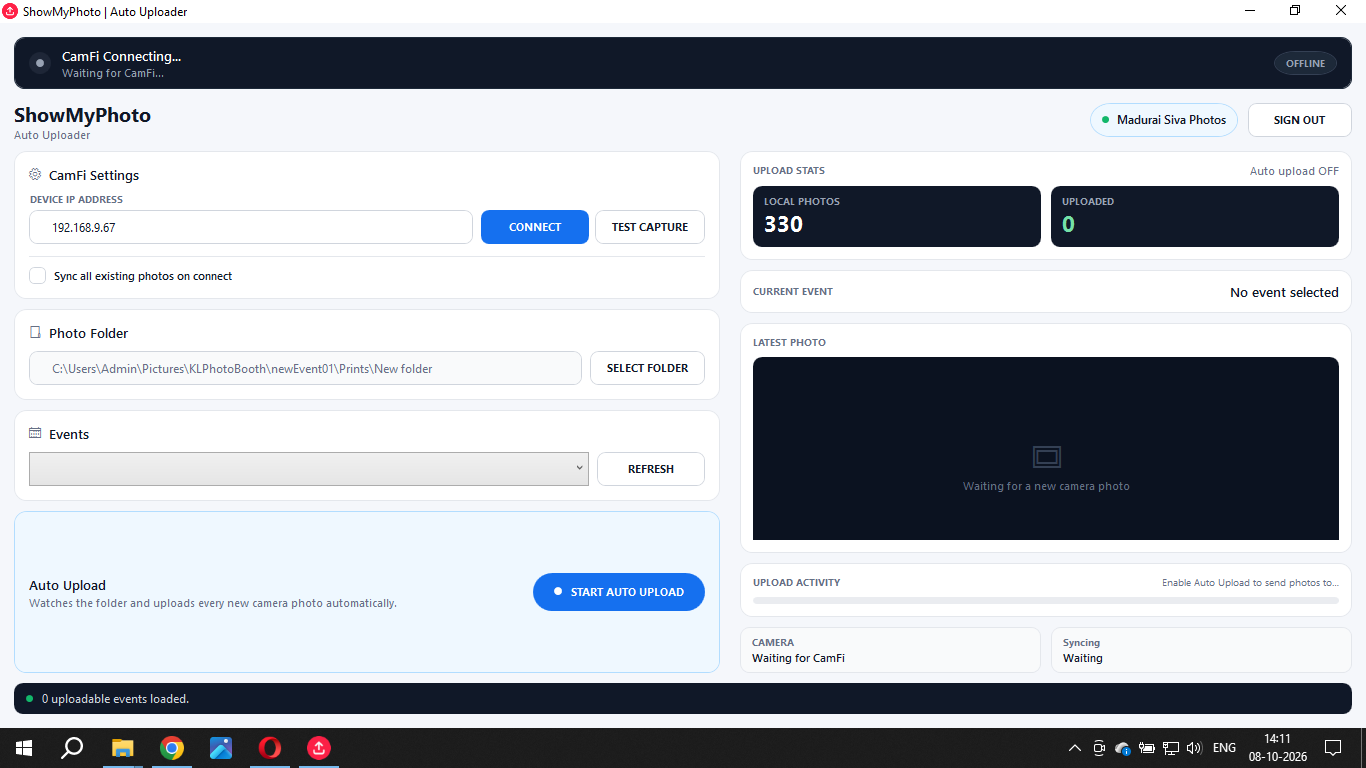
ShowMyPhoto Auto Uploader window showing camera connection status and upload statistics

Auto Uploader: computer to gallery

You point it at a folder. Every new photo that lands there is uploaded to your ShowMyPhoto event gallery, and the window shows connection and upload progress.

Want to set this up for your own event?

General guidance based on how this workflow is built. Test it before event day.

What you need

  • A camera that works with CamFi
  • A CamFi transmitter
  • A computer that stays on and connected to the internet (venue Wi-Fi or a mobile hotspot)
  • The ShowMyPhoto Auto Uploader and an event gallery

Tips before the day

  • Do a full test: shoot, transfer, upload, open the gallery on a phone
  • Check the internet speed at the venue, not just at the studio
  • Keep a backup of original files on cards as usual
  • Keep the computer plugged in and stop it from sleeping

What changed for the day

Photo delivery stopped being something that began after the event ended. The gallery grew while the convocation was happening, so graduates could start looking for their photographs as they left the stage and event area.

  • ✓ Far less manual uploading during the event
  • ✓ A continuous camera-to-gallery flow
  • ✓ Faster access for graduates and families
  • ✓ One online gallery for the whole convocation

Questions people ask about this workflow

How were PMIST convocation photos delivered during the event?

Surya Digital's photographers shot as normal. CamFi sent each new photo from the camera to a computer, and the ShowMyPhoto Auto Uploader watched that folder and uploaded new photos to the event gallery automatically.

What is the ShowMyPhoto Auto Uploader?

It is an application that monitors a folder on your computer and automatically uploads any new photographs in it to your ShowMyPhoto event gallery, so nobody has to upload files by hand.

What does CamFi do in this workflow?

CamFi is a wireless camera transmitter. In this setup it moved new photographs from the camera to the computer running the Auto Uploader.

Do photographers need to upload photos manually?

No. Once the camera transfer and the Auto Uploader folder are set up, new photos flow to the gallery in the background while photographers keep shooting.

Can this workflow be used for weddings or other events?

Yes. Any event where guests want photos quickly, such as weddings, college functions and corporate events, can use the same camera, computer, uploader and gallery chain.

Photographs from Periyar Maniammai Institute of Science & Technology, Thanjavur. Tap any photo to enlarge.

Photography: Surya Digital, Trichy.

Photographing an event of your own?

Give your clients their photos while the day is still fresh. See how ShowMyPhoto fits into your camera workflow.

Explore ShowMyPhoto